How I built Blendmux, Cursor for Blender
Blender has never had its Cursor moment. Here's how I built one.
Blender is open-source 3D modeling software for artists, and I've been using it since elementary school. When the GPT-6 models came out, I knew it was time for Blender to have its Cursor moment, so I built Blendmux.
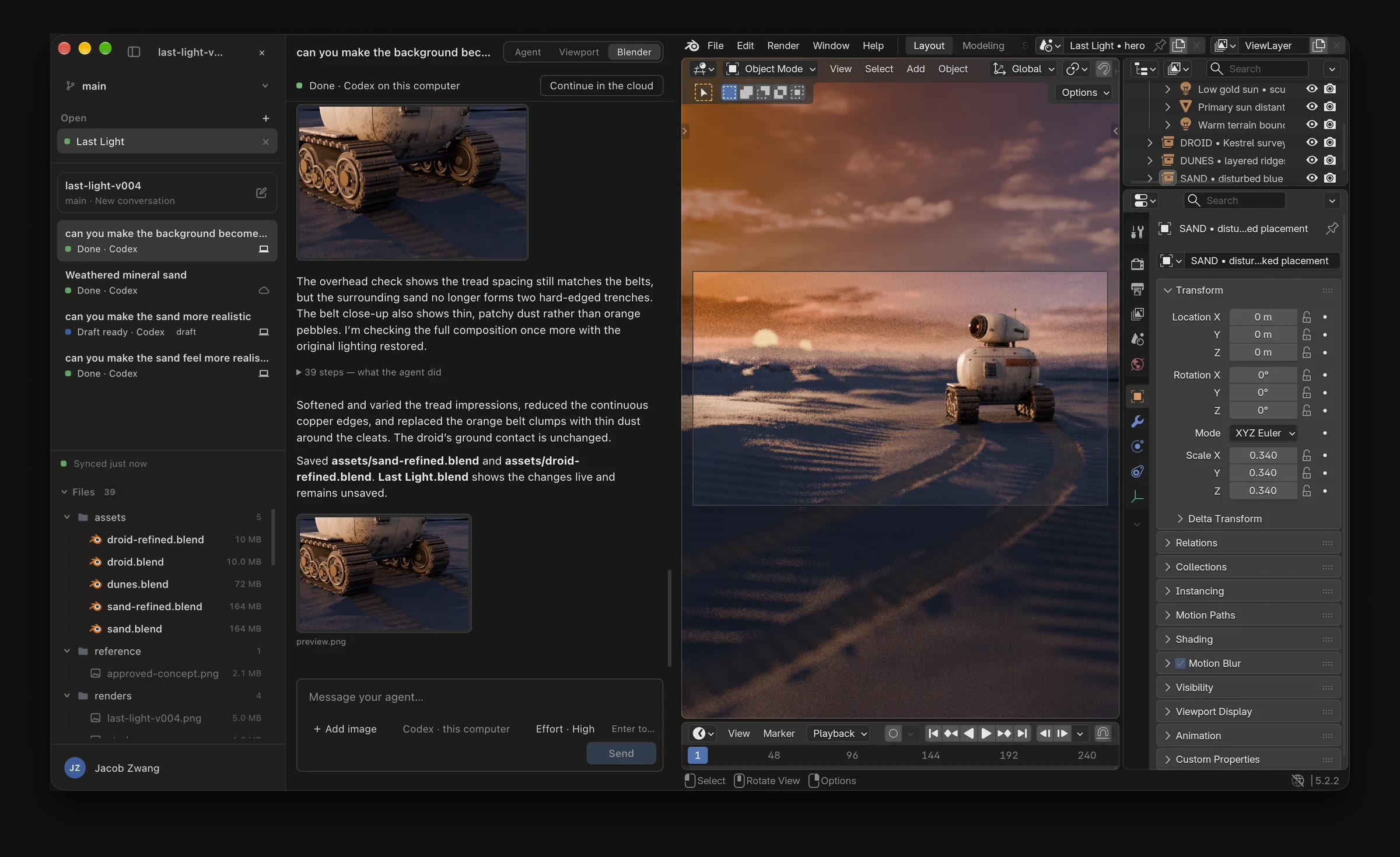
Getting chat into Blender
The first version lived inside Blender as a Python extension. The chat and task list were drawn by hand with Blender's GPU module, inside real Blender editors, on a widget toolkit of about a thousand lines.
It never felt right. Text editing, selection, scrolling, word wrap and cursors are each a small project to reimplement, and every one of mine was still slightly off.
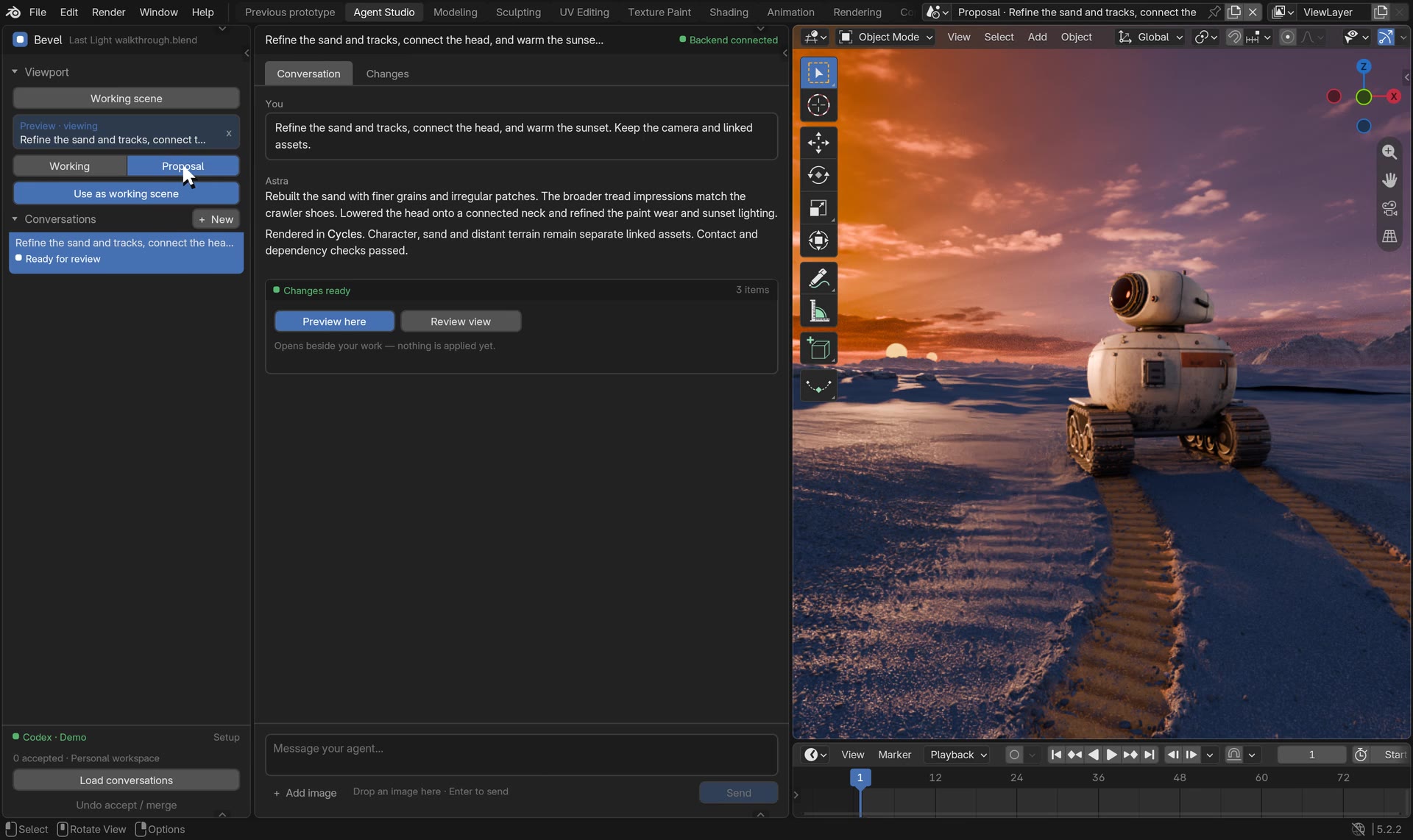
The first version: conversations and chat drawn by hand with Blender's GPU module.
So I embedded Chrome in Blender
The next version was like Electron for Blender add-ons. The add-on launched headless Chrome itself and drove it over the DevTools Protocol from plain Python, with no dependencies. Chrome's screencast frames were drawn into Blender's editor areas, and mouse and keyboard events were forwarded back. It worked pretty well, but it never quite felt native either. Luckily, I soon found out that putting the chat inside Blender wasn't the answer anyway.
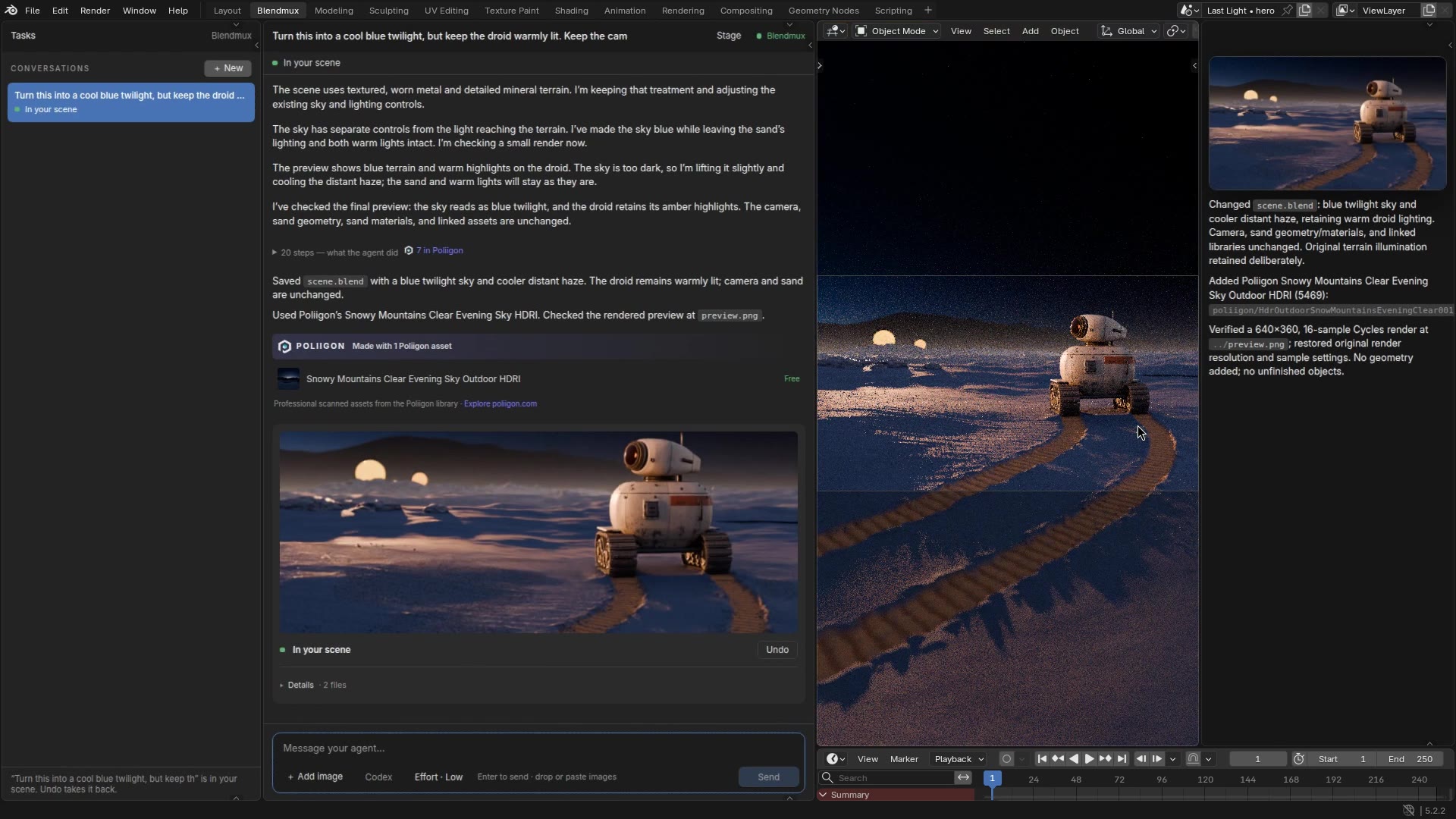
The Chrome version: the chat is the web app's UI, rendered by headless Chrome and drawn inside Blender.
Removing the chat from Blender
Building the chat into Blender felt like the right answer, but it wasn't practical. Blender isn't like a text editor: one Blender instance can only open one .blend file. A simple project fits in one file, but a complex one grows into many files that link assets from each other. That matters even more for AI agents, which need clear boundaries so they don't step on each other's work.
A Blender multiplexer
So instead of building into Blender, I built around it. Like in your favorite IDE, you open a folder of Blender files and work in many of them at once. Blendmux knows what's open, what's linked and what has unsaved changes, and it stops you and an agent from editing the same file at the same time. That gave me a platform to start building the agent on.
Prompt engineering is back
In the early days of AI, everyone talked about prompt engineering: how to word things to get the best out of a model. Then coding agents got good enough that they nearly always gave you what you wanted. Blender agents aren't there yet. One wrong word sends an agent in completely the wrong direction, or has it assemble something no real artist would want. So I spent countless hours writing and testing built-in prompts on good 3D modeling practice and on how to work well alongside artists.
Astra and Sol are really expensive
Astra and Sol are incredible models, but at API pricing the average Blendmux prompt costs several dollars, and it usually takes a few iterations. A Codex subscription makes that easier to stomach, but I wanted something artists could try for free without it costing me a fortune.
Luna
Luna is a twentieth of Sol's price and a hundredth of Astra's. With the prompt carrying the intent and the craft, it builds good scenes, and the low price makes me far more willing to try things and iterate. Ten iterations with Luna usually get me something I'm happier with than two with Astra. The catch is time: Luna turns take much longer and use 5–10x as many tokens. That isn't all bad, though. While Luna works, I can watch and steer it. With Astra, the whole scene appears quickly, without any guidance from me.
Version control with Git LFS
Version control is essential for AI agents, and even more so in Blender. A Blender project has far fewer files than a typical codebase, and they're large binaries, so almost any parallel work needs branches. Git has never been good with large binary files, but Git LFS was built for exactly that. It doesn't solve everything, though.
.blend files are binaries, and git can't diff them
Git can store a .blend, but it can't tell you what changed or merge two versions. Worse, Blender rewrites the file's bytes on every save even when nothing changed, so even "did this file change?" gives false positives.
At the file level, git's rules are still right: if only one side changed a file, take that side. That's why splitting a project into linked files matters so much. More files means fewer conflicts.
Diffing .blend files using Blender
For a file both sides changed, Blender does the diff. Blender loads the base and the agent's version, and builds an inventory of each and of your open scene. Every object gets a hashed signature per component: transform, mesh data, materials, modifiers, animation, parenting, visibility and agent notes. The scene gets its frame range, render settings, world and active camera.
Then it asks what source control asks: for each object, did the agent change it, did you change it, and did you change it differently? Components merge independently, so an agent that repainted a chair and a user who moved it don't conflict. The same inventory answers "did my open file really change?" without trusting the bytes.
Agents leave notes on what they change, like code comments, stored as custom properties on the objects so they travel through merges and undo. Notes never conflict: both sides' notes are kept.
When there is a real clash, such as the same object reshaped two ways, Blendmux offers "Merge with AI". The draft's agent gets both versions of the file side by side, combines them in one more turn, and you look it over before anything merges.
Blendmux cloud
Blendmux Cloud is a bit like GitHub and Cursor Cloud combined. It hosts your Git LFS repositories, runs agents, and lets you create and work on Blender projects in the Blendmux web app.
Running Blender on Freestyle VMs
Every VM runs an X server, Openbox and a full GUI Blender, and the workspace streams that Blender to your browser over VNC.
Fast workspace startup
Blender is a large application, and running and streaming it takes a lot of dependencies. We don't want to set all of that up every time someone creates a workspace, so we build a base snapshot with Blender and everything else already installed. Freestyle snapshots capture memory too, so we start Blender before taking the snapshot, and it's already running the moment you create a project. A new workspace is ready in about half a second.
Storing repositories in S3
There's no git server. Each project is a repository at s3://<bucket>/repos/<projectId>, through git-remote-s3, which stores each branch as a git bundle. Its LFS transfer agent stores each large file at <prefix>/lfs/<sha256>.
Secure tenancy with Freestyle S3 transforms
Agent VMs run model-written code, so I don't want a storage key anywhere on them. Freestyle TLS rules can transform a VM's outbound HTTPS requests at the edge, and one of the transforms is for S3. The VM signs its requests with placeholder keys. The edge checks the bucket, the prefix and the operation, then re-signs the request with the real key.
Each VM gets one rule scoped to repos/<its project>/. A workspace gets it when it's set up, and an agent gets it for one turn. Ask for another project's prefix and the edge answers 403 before the request reaches S3. Model API keys work the same way: the VM holds a placeholder, and the edge adds the real key.
Fast branching with snapshots and a VM per branch
Every branch is a VM. Main is the workspace you're looking at, and each draft gets its own VM with its own Blender, which you can watch and take over.
Rather than booting a fresh VM, cloning the project from S3 and reopening the scene, a draft forks the VM you're looking at: snapshot it, clone it, and the agent starts from exactly what you see, with Blender still running.
(Failed) Transpiling Blender's shaders to WebGPU
VNC sends pixels. I wanted to send draw calls instead and let the browser render them, which should be sharper and lighter on bandwidth.
I ran Blender on its Vulkan backend with lavapipe, a software Vulkan driver, and wrote a Vulkan layer that captured everything it did: objects, shaders, command buffers and writes to mapped memory. Blender doesn't reliably flush mapped memory, so the layer write-protected those pages and caught the faults. A relay translated the SPIR-V shaders, compiled from Blender's GLSL, into WGSL with Tint, and the browser replayed everything with WebGPU. It rendered real scenes.
It was hard all the way down. Blender emits SPIR-V 1.5, and Tint reads up to 1.3, so I wrote a downgrader. Push constants became storage buffers, and built-ins WebGPU lacks were rewritten. Blender's packed vertex normals have no WebGPU format, so the shaders were patched to decode them by hand. Tint's CLI had a bug in sampler mapping. The alternative translator, naga, handled 192 of 390 shaders.
I dropped it. It wasn't worth the complexity, it was still buggy, and it was slower: the VM still rendered every frame for Blender, and the browser rendered it again.
Try Blendmux
Blendmux desktop and Blendmux Cloud are free to try right now. For launch, Freestyle Cloud is giving every user $10 of OpenAI credit and unlimited free compute. Try it at blendmux.com.